Your CRM tells you when things happen.
Agency Beat tells you
when they don't.
Agency Beat watches the signals that matter — new leads, bookings, deals and payments arriving in every account — and alerts the right people the moment they stop. It also tells you when customers are left waiting for a reply. Uptime and HTTPS monitoring for funnels, sites, checkouts and APIs included.
Don't find out from the month-end numbers
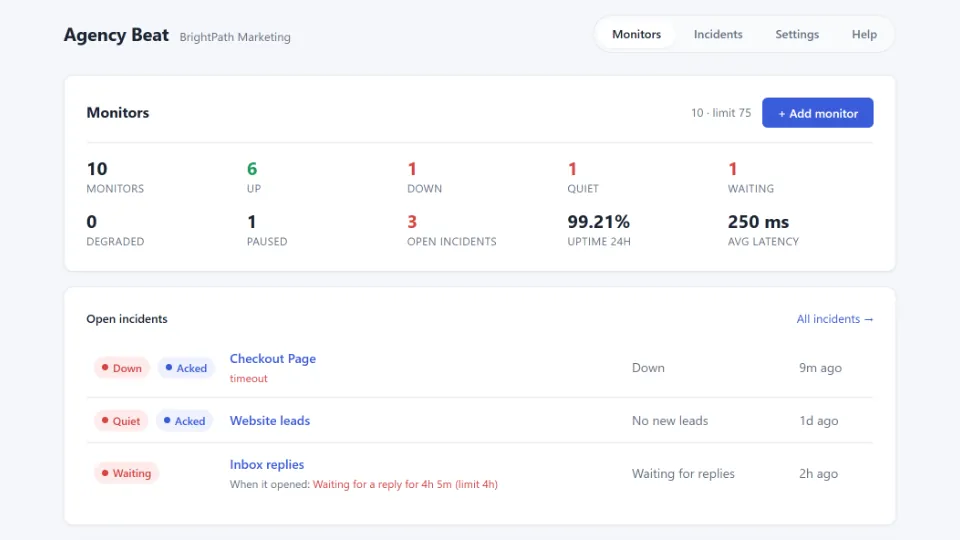
Websites crash loudly. Revenue doesn't — it goes quiet. A form breaks after an update, a calendar misconfigures, an ad account pauses, and the leads just… stop. No error, no alarm, a dashboard that looks normal. Agency Beat watches every signal you're on the hook for and tells you the one thing nothing else does: nothing is happening, and that's not normal.
Everything you need to catch the quiet — and the crashes
From the first missing lead to the all-clear, Agency Beat covers the whole incident.
Revenue-signal monitoring
Know the moment leads, bookings, opportunities, orders or payments stop arriving in any account. Set how long is too long without a new lead, booking or deal; business hours and quiet hours are respected. Watch a single pipeline when that's the one that matters.
Customer replies
See when customers are left waiting. Agency Beat watches each account's conversations and alerts you when someone has been waiting for a reply longer than you allow — or when too many are waiting at once. Mark a conversation as handled and it stops counting until the customer writes again. Message content is never stored.
Anything with a URL, watched
Platform-hosted funnels and sites, plus everything external — checkouts, booking pages, custom domains, third-party APIs. Checked around the clock, with a built-in "is it the platform, not your site?" gate so a 3 a.m. alert means something is actually wrong.
Email that always lands
Every alert emails the recipient you pick for that account — always, as the floor. Optionally, also POST each alert into your own workflow automation. An escalation ladder re-alerts until someone clicks Acknowledge.
Plus full incident history, monitor grouping, snooze, bulk pause/resume, and in-app help.
What each plan watches
Free
Is it up, did the leads stop? Uptime and HTTPS for any URL; new contacts, opportunities and appointments. Up to 3 monitors per account.
Pro
Are leads being answered? Everything in Free, plus Customer replies, pipeline-scoped opportunity monitors and daily or weekly account health digests. Up to 10 monitors.
Scale
Did the revenue stop? Everything in Pro, plus orders and paid invoices. Up to 75 monitors.
See it in action
Real screens from the dashboard.
See what's wrong — and its full history
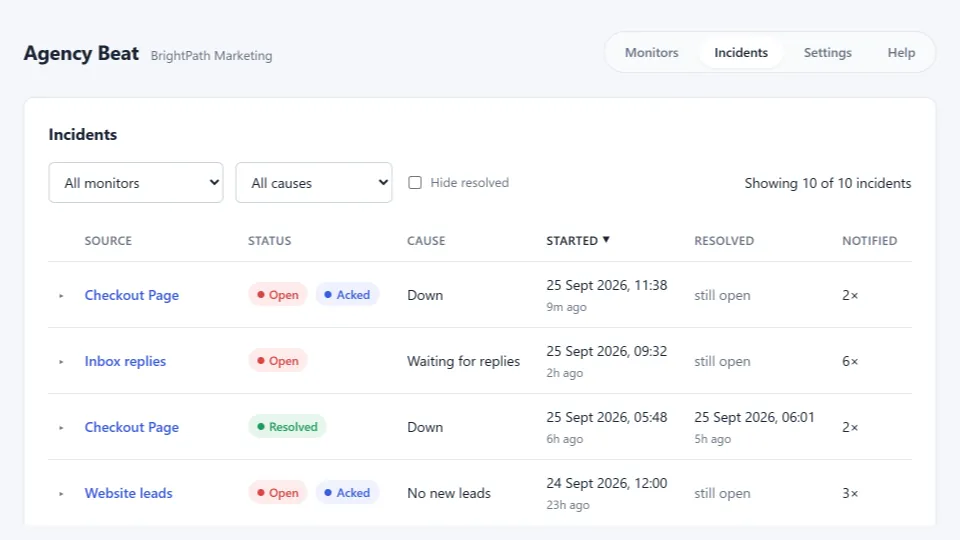
A live "what's wrong right now" panel sits on your dashboard, so the moment an asset breaks — or goes quiet — you see it. Behind it, a full, filterable incident history for every account: what happened, when it started, and when it came back.
Acknowledge — your team knows who's on it
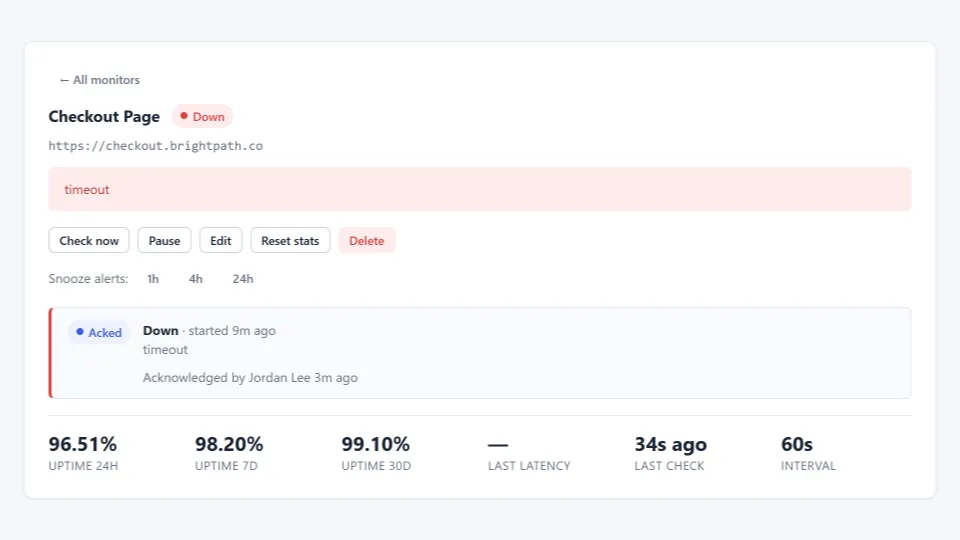
One click — from the alert email or right in the dashboard — marks an incident as handled. Teammates see who acknowledged it and when, so nobody double-responds. Repeat reminders pause, and the recovery alert still fires.
Escalate on your schedule
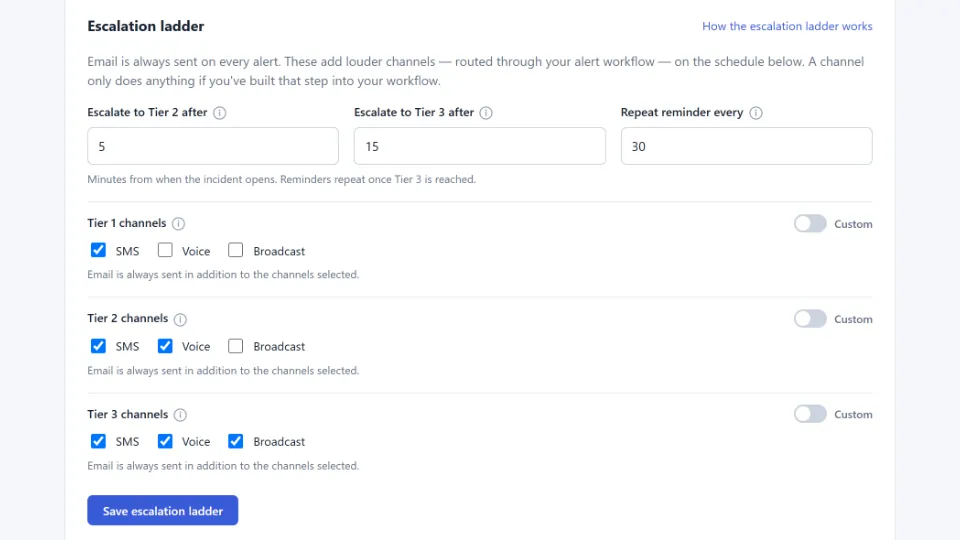
Set how long until an incident escalates, and which channels each tier adds — SMS, voice, or broadcast — all through your own connected workflow. Email is always sent in addition, so you never miss the first alert.
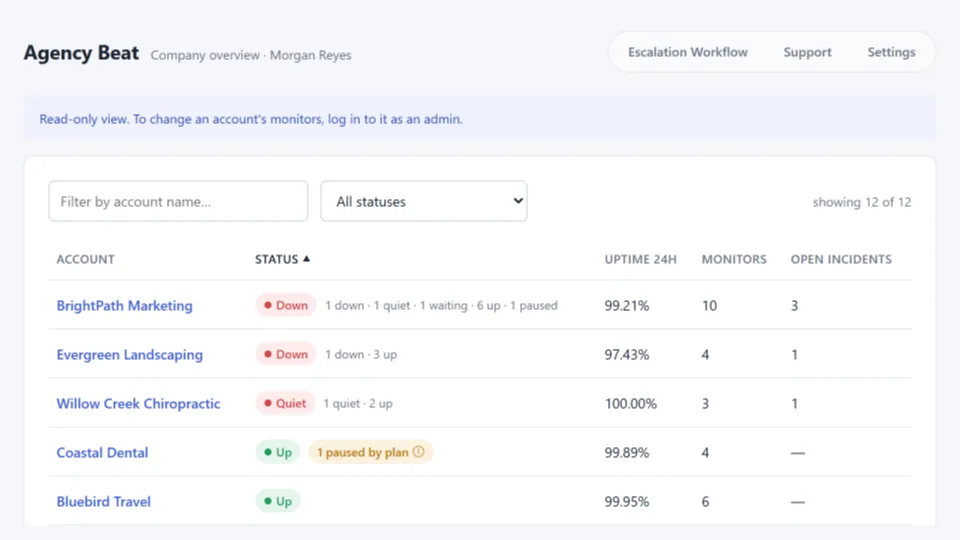
Every account, one screen
Managing many clients? See every account on one screen — worst-of status, 24-hour uptime, and open incidents at a glance. Drill into any account read-only; account admins still see only their own.
Skip the setup. Start escalating.
Every Agency Beat install comes with the Escalation Workflow — a prebuilt automation that turns an alert into the texts and calls that actually get someone's attention.
Agency Beat emails you the moment something goes down — or goes quiet. Always, no setup required. But an email isn't enough when a client's checkout has been offline for ten minutes.
The Escalation Workflow is the drop-in upgrade. Install it once, connect it, and your incidents route straight through your existing SMS and voice channels — escalating automatically as an incident drags on.
No building branches by hand. No piecing together an alert ladder from scratch. The workflow ships ready to fire and maps exactly to how Agency Beat escalates, so the right channel hits at the right time, every time.
- Prebuilt and ready — install, connect, done.
- Tiered escalation built in — text first, escalate to voice as the incident ages.
- Yours to keep — free with every Agency Beat install, across every account you manage.
Running an agency?
Install Agency Beat across every account you manage in one pass, and watch your whole book from a single board — the quiet ones sort themselves to the top. Runs cleanly inside branded portals and custom domains. And because it's built for reselling, you can offer it to clients under your own pricing.
- Bulk install across your accounts
- One cross-account board + a daily or weekly portfolio digest
- Resell under your own pricing
Live in three steps
-
Install
Add Agency Beat from your marketplace in a couple of clicks.
-
Pick what to watch
Point it at your funnels, sites and checkouts — or at the leads, bookings and deals themselves.
-
Relax
Get alerted the moment one goes down — or goes quiet — acknowledge in a click, and hear again when it recovers.